If you can not restore Premium, please first check your current subscription status:
----
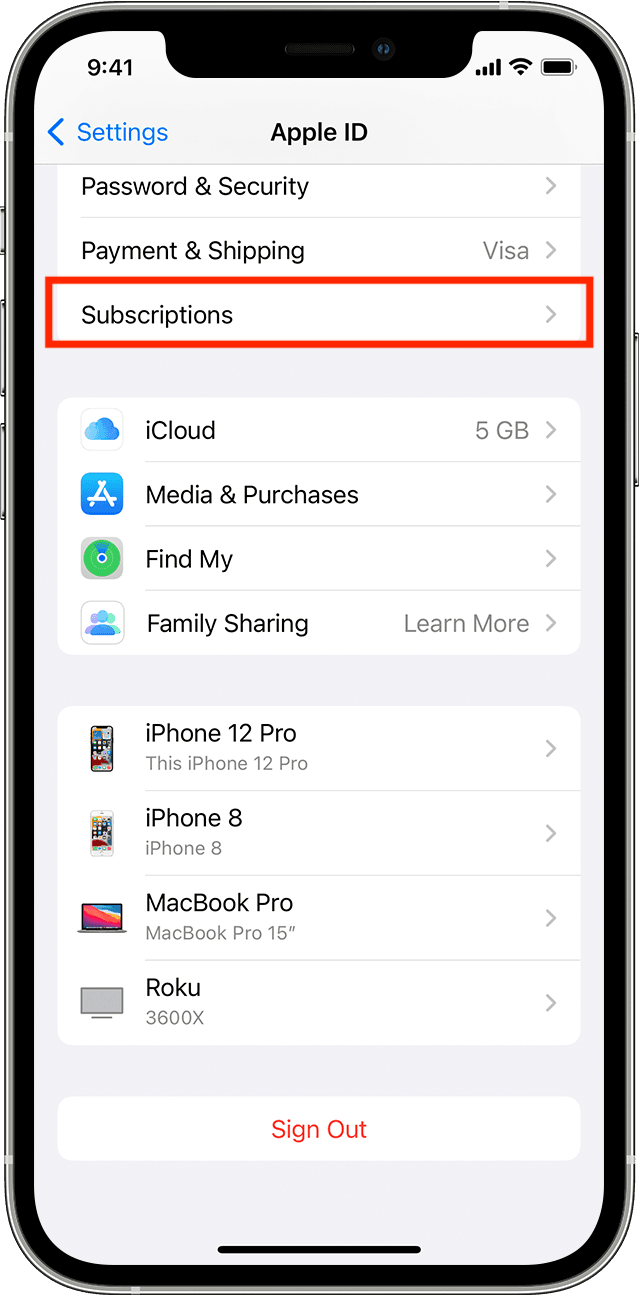
(1) Open the iOS Settings app on your device.
(2) Tap your name.
(3) Tap Subscriptions.
----
If you confirm that your subscription status is valid on the iOS Settings app, try the following steps in order to restore your Premium subscription:
-----------------
#1. Update the app to the latest version.
https://apps.apple.com/us/app/id1226502637
#2. Quit the Weight Loss app.
https://support.apple.com/en-us/HT201330
#3. Restart your device.
https://support.apple.com/en-us/HT201559
#4. Go to the Premium page on the Weight Loss app.
#5. Tap "Restore previous purchases" and then tap "Restore."
*If #5 doesn't work, follow the instructions below:
#6. Tap the Purchase button on the Premium page.
#7. If you have already subscribed to Premium, you may see the alert dialog with the message: "You're currently subscribed to this."
#8. Tap "OK" on the alert dialog.
*If you want to use Premium on multiple devices or a newly purchased device, please take a look at the link below as well:
/articles/48054-how-to-use-premium-on-multiple-devices
-----------------
If the above solution does not work, we would still like to help solve your problem, so please contact us via the Weight Loss Help Center.